CI/CD is one of the most important concepts in DevOps. However, for many beginners, it still feels confusing and abstract. In most cases, tutorials explain tools and theory, but they fail to show how CI/CD actually works in real projects.
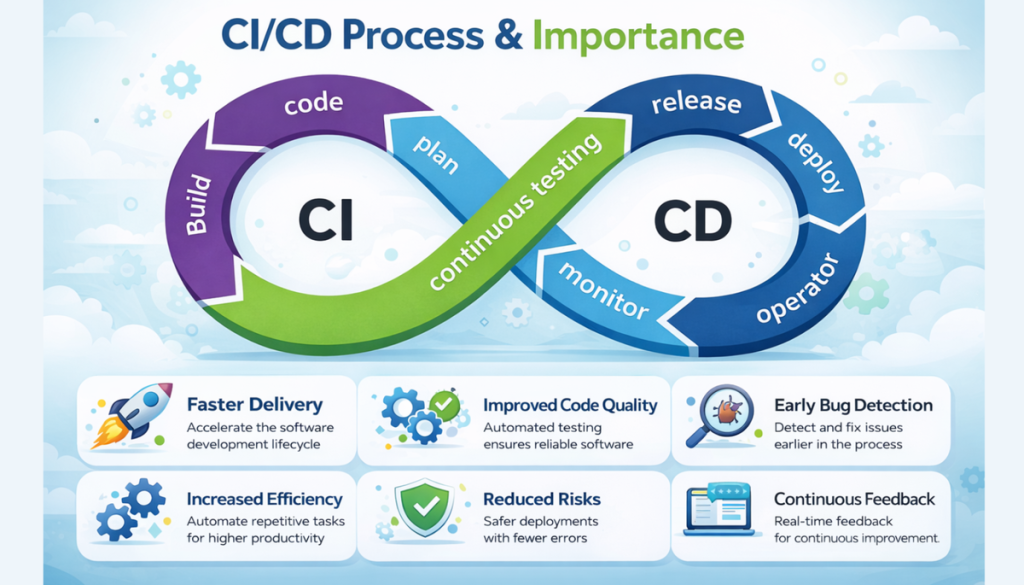
Therefore, in this blog, I will explain CI/CD using a real-world example from my own journey. More importantly, I will share my first hands-on CI/CD experience and how I implemented pipelines in real environments.
Overall, this blog is especially useful if you are a beginner or someone who understands tools but struggles to connect the complete picture.
My First CI/CD Experience (From “Wow” to Real Implementation)
When I first heard about CI/CD, my reaction was simple:
“Wow… what kind of hack is this?
We are not touching anything, yet the code is getting deployed automatically!”
At that time, I couldn’t clearly understand:
- How changes were reflected without manual work
- How deployments happened automatically
- How this worked in real production environments
Because of this, instead of just reading theory, I decided to learn CI/CD by building it myself.
Learning CI/CD with Jenkins (My First Hands-On)
Initially, I started my CI/CD journey with Jenkins, an open-source automation tool. Rather than using a ready-made setup, I chose to build everything from scratch.
As part of this process, I:
- Installed Jenkins manually
- Configured jobs and pipelines
- Integrated Jenkins with GitHub using webhooks
- Deployed applications to EC2 instances
Through this approach, CI/CD finally started making sense to me. In fact, I didn’t just run pipelines—I broke them, fixed them, and improved them continuously.
CI/CD in a Startup: AWS CodePipeline & CodeDeploy
Later on, when I joined a startup, my understanding of CI/CD expanded further. At this stage, I worked with AWS-native CI/CD services.
Specifically, I implemented pipelines using:
- AWS CodePipeline
- AWS CodeBuild
- AWS CodeDeploy
Additionally, the pipeline included multiple real-world steps:
- Code pulled from the repository
- Build and test execution
- Code quality analysis using SonarQube
- Docker image build
- Image pushed to Amazon ECR
- Deployment to EC2 (staging environment)
- Real-time notifications sent to Slack
As a result, this pipeline was reliable, automated, and actively used by development teams.
What Is CI/CD? (Simple Explanation)
CI – Continuous Integration
In simple terms, Continuous Integration means automatically building and testing code whenever a developer pushes changes.
As a result, CI ensures:
- Code is built automatically
- Tests run consistently
- Errors are detected early
CD – Continuous Delivery / Deployment
Similarly, Continuous Delivery or Deployment means automatically deploying the application once the build and tests succeed.
In other words:
- CI checks if the code is correct
- CD delivers that code to servers automatically
Together, CI and CD help teams release software faster, safer, and more frequently.
The Problem Without CI/CD (Real-Life Scenario)
Before CI/CD pipelines existed, deployments were mostly manual.
For example, a typical deployment involved:
- Logging into servers
- Copying files manually
- Restarting services
- Hoping nothing broke
Consequently, this approach caused:
- Human errors
- Deployment failures
- Difficult rollbacks
- Late-night production issues
Eventually, as applications grow, this model becomes unsustainable.
A Real-World CI/CD Pipeline Flow
Now, let’s look at how a real CI/CD pipeline works step by step.
Step 1: Code Push
First, a developer pushes code to a Git repository.
Step 2: Pipeline Trigger
Next, the pipeline starts automatically using webhooks.
Step 3: Build Stage
Then:
- The application is built
- Dependencies are installed
- Errors are validated
Step 4: Test Stage
After that:
- Tests are executed
- The pipeline stops if tests fail
Step 5: Docker Image Creation
Subsequently:
- A Docker image is built
- The image is versioned
Step 6: Push Image to Registry
Following this:
- The image is pushed to a container registry
Step 7: Deployment
Finally:
- The application is deployed
- Old versions are replaced safely
As you can see, the entire process happens automatically.
Tools Commonly Used in CI/CD Pipelines
In real-world environments, these tools are commonly used:
- Git for source control
- Jenkins, GitHub Actions, or GitLab CI for automation
- Docker for containerization
- Kubernetes or EC2 for deployment
- AWS for infrastructure
Although tools may change, the CI/CD concept remains constant.
Benefits of Using CI/CD
When implemented correctly, CI/CD provides several advantages:
- Faster releases
- Fewer bugs
- Consistent deployments
- Easy rollback
- Reduced manual effort
Therefore, teams can focus more on building features.
Common Mistakes Beginners Make
Based on my experience, beginners often:
- Skip proper testing
- Hardcode secrets
- Ignore rollback strategies
- Overcomplicate pipelines
- Treat CI/CD as a tool instead of a process
Because of this, pipelines become fragile and difficult to maintain.
Conclusion
In conclusion, CI/CD is not about Jenkins, GitHub Actions, or AWS tools.
Instead, it is about automation, reliability, and confidence.
So, start small:
- Build simple pipelines
- Break things
- Learn from failures
Over time, this approach will help you grow into a strong DevOps engineer.
Leave a Reply