In today’s fast-moving digital world companies must release software quickly without breaking things. This is where DevOps comes in.
But don’t worry. DevOps is not scary and it is not just tools. Let’s understand it step by step in simple words.
What is DevOps?
DevOps is a combination of culture, practices, and tools that helps teams build, test, and release software faster and more reliably.
The word DevOps comes from two terms:
- Dev → Development (writing code)
- Ops → Operations (deploying, running, and maintaining systems)
DevOps helps developers and operations teams work together as one team.
Why Was DevOps Needed?
Earlier:
- Developers wrote code
- Operations teams deployed it
- These teams worked separately
- Result:
- Slow releases
- More failures
- Blame games
As businesses started depending more on software this approach became too slow.
DevOps solves this by breaking silos and automating everything possible.
How Does DevOps Work?
In a DevOps model:
- Developers and Operations collaborate closely
- Sometimes they are even one single team
- Everyone is responsible for the full lifecycle:
- Code
- Test
- Deploy
- Monitor
- Improve
Additionally:
- Security and QA are included early
- This is called DevSecOps
Instead of “develop → throw over the wall → operate”, DevOps follows:
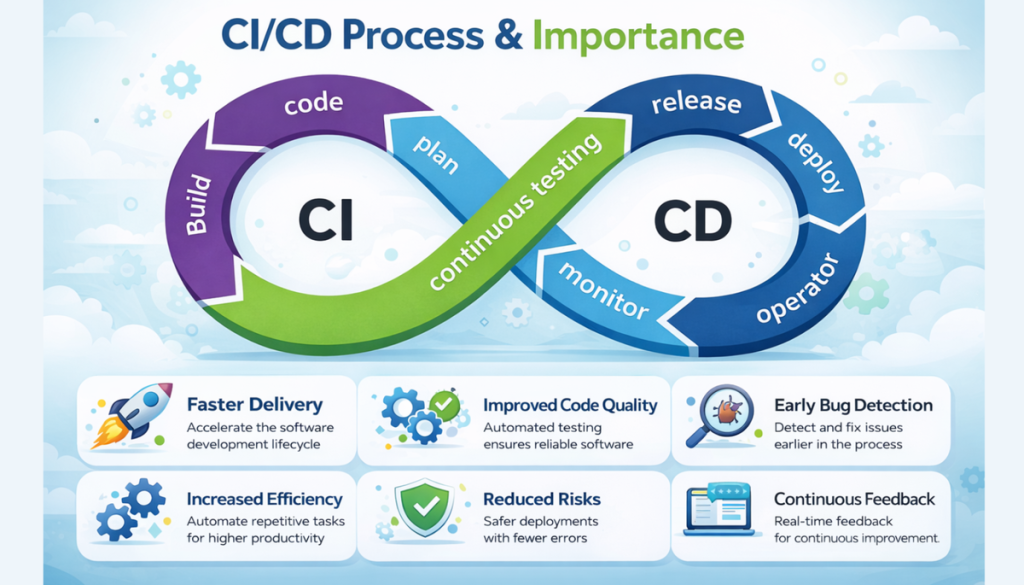
Build → Test → Deploy → Monitor → Improve (continuously)
Key Benefits of DevOps
1. Speed
DevOps helps teams release features faster using:
- Automation
- CI/CD pipelines
- Microservices
This allows businesses to respond quickly to customer needs.
2. Rapid Delivery
With Continuous Integration (CI) and Continuous Delivery (CD):
- Code is tested automatically
- Deployments happen frequently
- Bugs are fixed faster
Smaller and frequent releases = less risk
3. Reliability
It ensures stability by using:
- Automated testing
- Monitoring
- Logging
This helps teams detect problems early and fix them before users notice.
4. Scalability
Using automation and Infrastructure as Code, teams can:
- Scale systems easily
- Manage complex environments
- Reduce human errors
5. Better Collaboration
- Shared ownership
- Accountability
- Better communication
This reduces delays and improves productivity.
6. Security
This practice does not ignore security.
Instead, security is automated and built into pipelines:
- Policy as Code
- Automated compliance checks
- Secure configurations
This allows teams to move fast without sacrificing security.
Why DevOps Matters Today
Software is everywhere:
- Banking
- Shopping
- Entertainment
- Healthcare
Modern companies are software-driven businesses.
Just like factories adopted automation in the past, today’s companies must automate software delivery and it makes that possible.
DevOps Culture: The Foundation
it is not just tools — it’s a mindset.
Key cultural values:
- Collaboration over silos
- Ownership over blame
- Automation over manual work
- Continuous improvement
Teams take responsibility from idea to production and beyond.
Core DevOps Practices
1. Continuous Integration (CI)
- Developers frequently push code
- Automated tests run immediately
- Bugs are caught early
Result: Better quality software
2. Continuous Delivery (CD)
- Code is always deployment-ready
- Automated pipelines prepare releases
- Faster and safer deployments
3. Microservices
Instead of one big application:
- App is split into small services
- Each service does one job
- Services can be deployed independently
This increases flexibility and speed
4. Infrastructure as Code (IaC)
- Infrastructure is written as code
- Version controlled like application code
- Easy to recreate environments
Example tools:
- Terraform
- CloudFormation
5. Configuration Management
Automates:
- Server setup
- Software installation
- System configurations
Example tools:
- Ansible
- Chef
- Puppet
6. Policy as Code
- Security and compliance rules written as code
- Automatically enforced
- Prevents misconfigurations
7. Monitoring and Logging
Helps teams:
- Track performance
- Detect issues in real time
- Improve user experience
Examples:
- Metrics
- Logs
- Alerts
8. Communication & Collaboration
teams use:
- Chat tools
- Issue trackers
- Wikis
This keeps everyone aligned and informed.
DevOps Tools
It relies on tools to automate and scale processes, such as:
- CI/CD tools
- Cloud platforms
- Monitoring systems
- Infrastructure tools
Cloud providers like AWS offer services designed specifically for best practices.
Final Thoughts
DevOps is about:
- People
- Processes
- Automation
It helps organizations:
- Deliver software faster
- Improve quality
- Increase customer satisfaction
Learn Tech With Me
To help you continue your journey, I regularly share hands-on tutorials, real-world projects, and beginner-friendly explanations.
Watch & Learn on YouTube
If you prefer visual and practical learning, check out my YouTube channel where I explain:
- Tech concepts in simple language
- CI/CD pipelines (Jenkins, GitHub Actions)
- Docker & Kubernetes hands-on demos
- Cloud real-world projects
Subscribe here: www.youtube.com/@Insightcloud-devops
Explore More Content
Visit my website to find:
- Beginner-to-advanced blogs
- Step-by-step roadmaps
- Project guides and resources
Visit my homepage: https://devops-pilot.com/
Leave a Reply